Azan not sounding?Check your phone settings
Al-Inarah schedules the azan as alarms on your phone. Some Android phones freeze apps in the background to save battery, and those alarms are held until the app is opened again. The settings below tell your phone not to do that.
Check inside the app first (Android)
Home › prayer times card › ⋮ › Settings › scroll to the bottom › Azan not sounding?
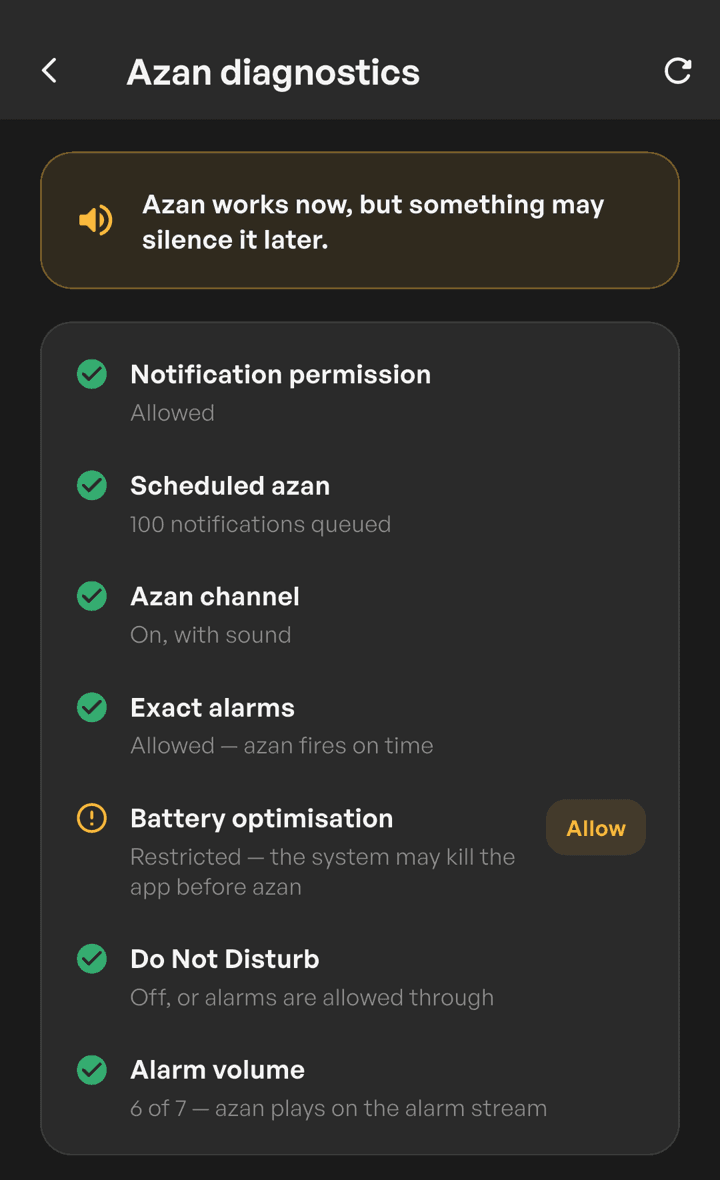
Azan diagnostics checks notification permission, exact alarms, battery, Do Not Disturb and volume, with a button straight to the setting that needs changing.
For everyAndroid phone
Check these first. Menu names may differ slightly between models.
Notifications on
Settings › Apps › Al-Inarah › Notifications. Make sure the azan channel is not turned off.
Exact alarms allowed
Settings › Apps › Al-Inarah › Alarms & reminders › Allow. Without it the azan can be a few minutes late.
Battery unrestricted
Settings › Apps › Al-Inarah › Battery › Unrestricted.
Volume loud enough
The azan follows your alarm volume, or media volume if you picked Media in the Al-Inarah notification sound settings.
Do Not Disturb allows alarms
Settings › Do Not Disturb › Alarms on, if you use this mode.
Do not force stop the app
Force stop and cleaner apps erase every scheduled azan. Open Al-Inarah again afterwards so the schedule is set back up.
Steps byphone brand
After changing a setting, open Al-Inarah once so the azan schedule is set up again. Phones do not let us read these settings, so the app cannot confirm them for you.
Tecno, Infinix, itel
Why
These phones freeze apps in the background and hold all of their alarms, the azan included, until the app is opened again. The usual Android battery setting does not stop this.
Steps
- Open the Phone Master app › Toolbox › Auto-start management, then turn on Al-Inarah.
- In Phone Master › App Booster, add Al-Inarah.
- Open Power Marathon, turn off Power Boost and Sleep Mode Optimization.
- Settings › Battery Lab › Battery Saving Settings, turn off power saving management for Al-Inarah.
Xiaomi, Redmi, POCO
Why
HyperOS and MIUI can freeze apps in the background and hold their alarms. No restrictions takes the app out of that freezer.
Steps
- Settings › Apps › Manage apps › Al-Inarah.
- Battery saver › No restrictions.
- Go back to the app page and turn on Autostart.
OPPO, realme, OnePlus
Why
ColorOS can stop background apps when auto launch and background activity are not allowed.
Steps
- Settings › Apps › App management › Al-Inarah.
- Turn on Allow auto launch.
- Battery usage › Allow background activity.
vivo, iQOO
Why
vivo background power management can stop apps that are not allowed to run in the background.
Steps
- Settings › Apps › Al-Inarah, turn on Autostart.
- Settings › Battery › Background power consumption management › Al-Inarah › Allow.
Huawei, Honor
Why
App launch management controls whether an app may run in the background.
Steps
- Settings › Battery › App launch › Al-Inarah.
- Choose Manage manually, then turn on Auto-launch, Secondary launch and Run in background.
Samsung
Why
One UI does not hold azan alarms by default. If the azan is still silent, make sure Al-Inarah is not in the sleeping apps list.
Steps
- Settings › Battery › Background usage limits.
- Never sleeping apps › add Al-Inarah.
- Make sure Al-Inarah is not in Sleeping apps or Deep sleeping apps.
iPhone
Why
Apple limits how long a notification sound can play, so the azan on iPhone is a short version.
Steps
- Settings › Notifications › Al-Inarah › Allow Notifications, and turn on Sounds.
- If you use Focus, allow Al-Inarah in that Focus mode.
Still not sounding?
Open Al-Inarah, then send a prayer times problem report from inside the app. The report includes the azan schedule state on your phone so we can look for the cause.